Build Models: The Basics#
In this section, we provide a basic example of building VAMPIRE models by
setting up working directory
understanding information used to build model
build model using
vampire.model.build_models
Setting up the stage#
Suppose we have two brain slice image sets:
a set that has been exposed to oxygen-glucose deprivation (OGD)
a set of no treatment control
We want to build a VAMPIRE model and apply to each of the image set to explore their morphologies. To do this, we need to build a model using images from both sets. We can then apply the model onto each set to see the distribution of shape modes.
Directory structure#
To achieve the goal, We setup a directory with the following structure (suppose this is under the root directory of C:\ in Windows for convenience):
   |-- vampire-ogd
       |-- both
           |-- 4-50-4_40x_cortex_1_c1.tiff
           |-- ...
       |-- control
           |-- 4-50-4_40x_cortex_1_c1.tiff
           |-- ...
       |-- ogd-30min
           |-- 4-56-1_40x_cortex_1_c1.tiff
           |-- ...
       |-- build.xlsx
where
the
controlfolder contains segmented images in the control group in.tifffilesthe
ogd-30minfolder contains segmented images in the 30 min OGD group in.tifffilesthe
bothfolder contains all the same images incontrolandogd-30minthe
build.xlsxfile contains information about the images sets used to build models, which we will discuss below.
Image set information#
The build.xlsx file contains information of the image sets used to build VAMPIRE models. The spreadsheet contains 6 column:
img_set_path |
output_path |
model_name |
num_points |
num_clusters |
channel |
|---|---|---|---|---|---|
|
|
control-ogd-30min |
50 |
5 |
c1 |
The first 5 columns are the required columns. These columns must present in the file to build a model:
img_set_path- absolute path to the directory containing the image set used to build modeloutput_path- absolute path to the directory used to output model files and figuresmodel_name- name of the image set used to build modelnum_points- number of points used to describe object (cell or nuclei) contoursnum_clusters- number of clusters used in K-means clustering; each cluster corresponds to a shape mode
The columns beyond the first 5 columns (in this case, column 6), are optional columns. These columns are used to filter image filenames, where only images with the filter tag are used in building model. For example, we have
channel- the filtering type is image channelc1- only images containing the textc1are used in building the model.
Be sure to save and close the file to avoid potential permission error in future steps.
.. _build_basics_building_models:
Building models#
Now we can start to use the vampire package to build a VAMPIRE
model. We first import necessary modules.
>>> import pandas as pd  # used to read excel file
>>> import vampire as vp  # recommended import signature
We then read build.excel as a pandas DataFrame.
>>> build_df = pd.read_excel(r'C:\vampire-ogd\build.xlsx')
>>> build_df

img_set_path          output_path      model_name          num_points   num_clusters   channel
C:\vampire-ogd\both   C:\vampire-ogd   control-ogd-30min   50           5              c1
To build a VAMPIRE model, simply use the vampire.model.build_models function and pass in the DataFrame.
>>> vp.model.fit_models(build_df, random_state=1)
Note that we arbitrarily set the random state as 1 for reproducibility. Depending on the amount of images used to build the model and amount of objects in the images, the function will run for a few seconds to a few minutes.
Resulting outputs#
Build model outputs results into the output folder and stores contour coordinates and properties of objects in the image set folders.
Output folder#
The resulting outputs in the output folder C:\vampire-ogd are:
shape_mode_build_control-ogd-30min.png
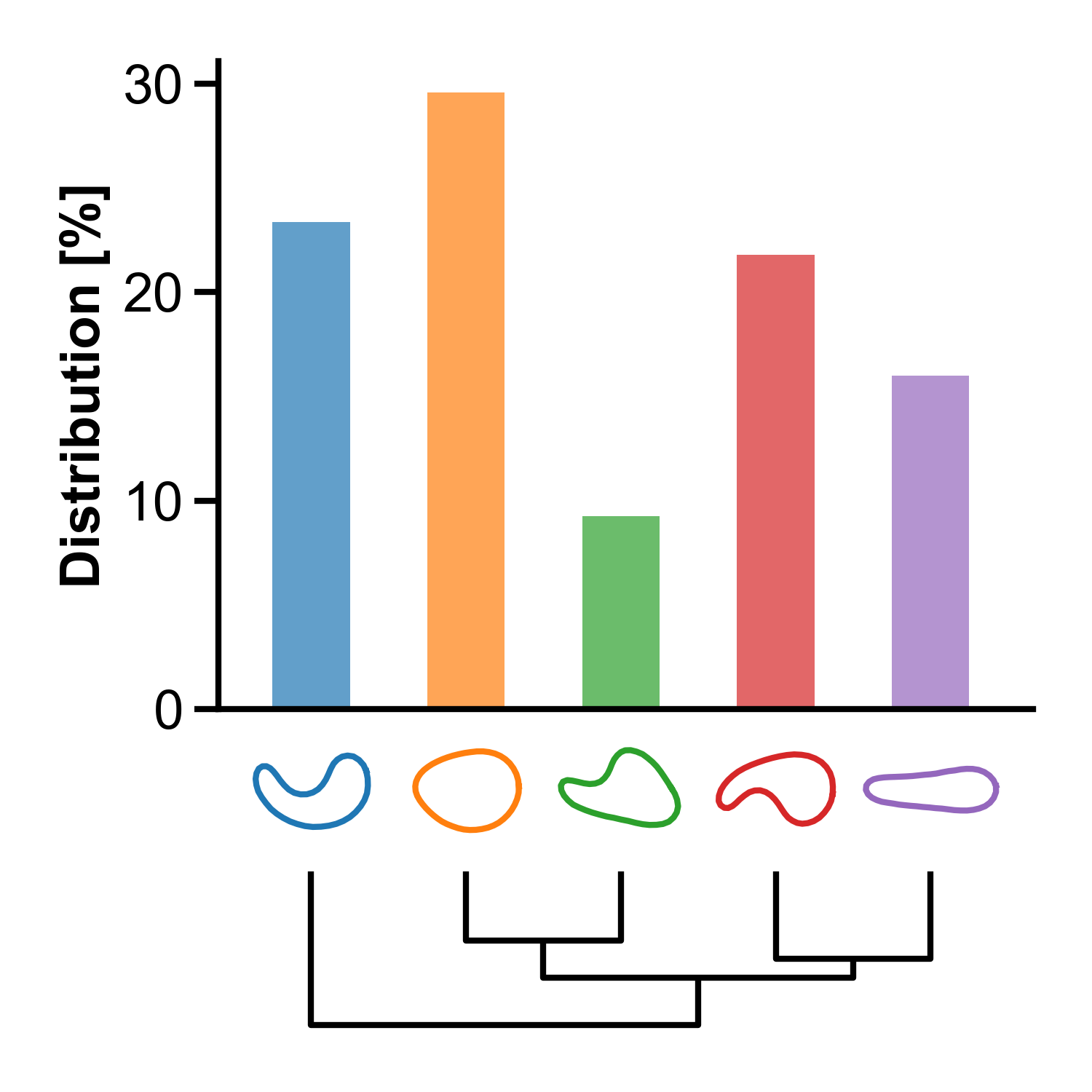
The figure contains shape mode visualization, dendrogram, and distribution of the build image set. As shown in the figure, the round orange shape mode (#2) appears the most frequent in the image set containing both no treatment control group and OGD 30 min group.
control-ogd-30min.pickleThe
.picklefile contains information about the VAMPIRE model. It is used when applying the model. For more information about the implementation details, refer tovampire.model.initialize_model.
Image set folders#
The resulting outputs in the image set folder C:\vampire-ogd\both are:
contour_coordinates__c1.pickleThe
.picklefile stores information about the contour coordinates of objects in the image set. It can be reused when the image set is used in applying or building model.vampire_datasheet__c1.csvThe
.csvfile stores properties of objects in the image set, such as centroid coordinates, area, and aspect ratio.
Conclusion#
Congratulations! We have built our first VAMPIRE model. Next, we’ll look at how to apply the VAMPIRE model.